 dmitry prikotov
AI coding agents: how I prepared my project
Translations: Русский оригинал · 中文版本
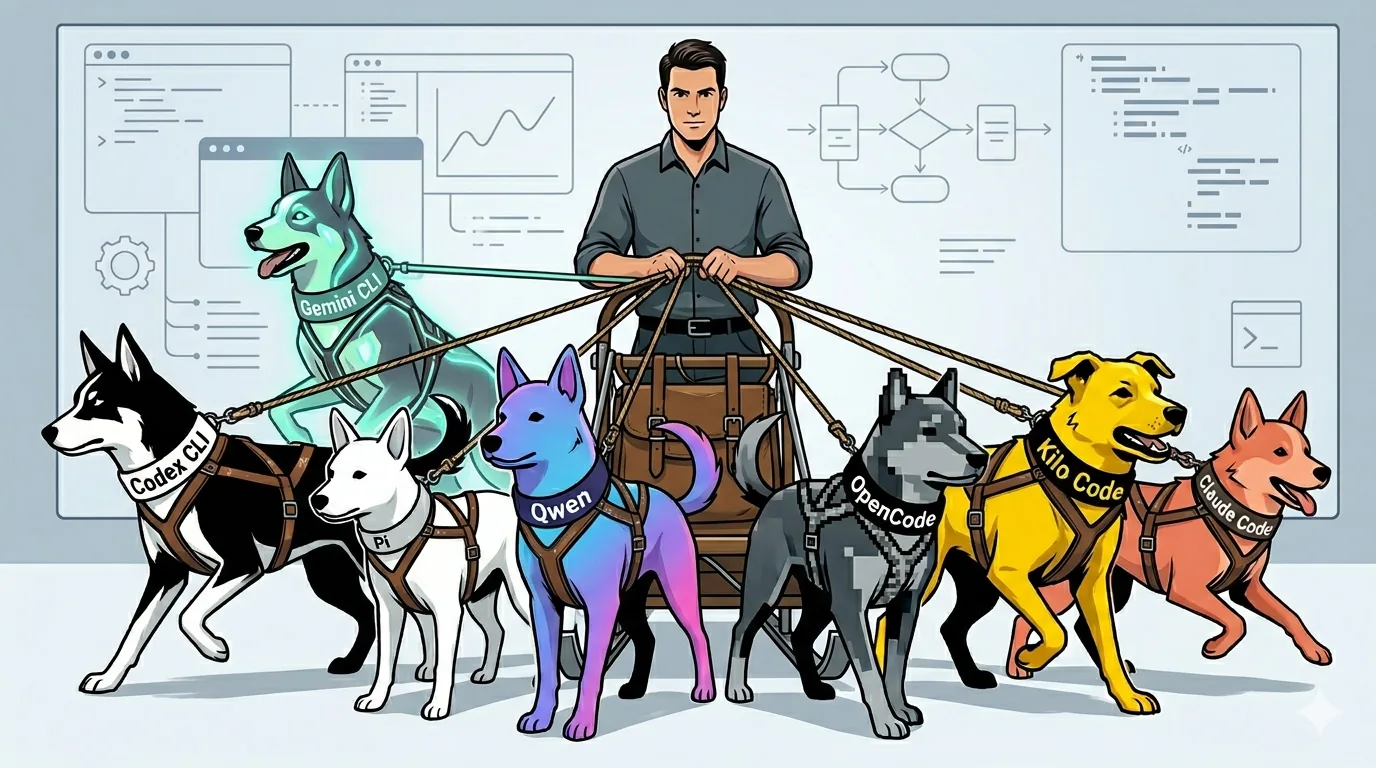
"Same thing as with people."
— an old saying
TL;DR: For almost a year, I have been adapting my project for AI-agent-assisted development. The conclusion is simple: the model matters, but the harness around it matters even more — instructions, rules, tools, roles, and short feedback loops through tests, static analysis, self-review, and agent-based code review. A human still does final review. After switching to this process, change throughput increased: weekly diff churn — added plus deleted lines — grew 11.3x; net line growth grew 4.5x while code quality stayed under control.
I postponed this article for a long time because the process kept changing. First there was Codex Cloud, then CLI, then roles, markdown tasks, checks, conventions, and the first experiments with orchestration. Now it looks close enough to a working system that I can show it.
I started carefully: I gave the agent small edits and checked almost every line. Gradually, I moved into agent instructions what I used to keep in my head: rules, the needed context, architectural constraints, and validation commands. This created a harness around the agent and the model that helps them work with a large project.
In this article, I’ll show what I do so that:
- the AI agent does not write bad code;
- new changes do not break old behavior;
- the agent follows instructions;
- it does not forget project context and previous decisions;
- I spend less time checking its work;
- and I can see how AI agents affect my productivity.
Who this article is for
There are two loud camps.
The first one: "AI can’t do anything; a real developer will do everything better." This is like saying you hate coffee after trying burned gas-station coffee once. AI agents are similar. If you throw a task at an agent with no context, no recipe, and no prepared project, it will start guessing your taste. Sometimes it guesses right. More often it cooks the way it thinks is correct.
The second one: "AI will replace everyone; developers are no longer needed." Managers start dreaming about teams without programmers, programmers start dreaming about projects without managers. Sounds great, but real work still hits the same wall: responsibility and expert review of the result.
I’m in the middle: an AI agent is an expert amplifier. I treat AI as a tool. You need to try it, study it, embed it into your workflow, and use it to amplify yourself, your team, and your company. Buying a model subscription is not enough. You need AI-first and AI-friendly processes where the agent gets context, follows rules, rechecks the result, and never stays without human expert supervision.
For the first group, I’ll show what I did to make the AI agent work better: which rules I gave it, which context I moved into files, which checks I added, and where AI should not be trusted without verification.
For the second group, I’ll show where the boundary is: what can be delegated to AI and what is better kept by the human expert. The agent can write code, run checks, gather context, and propose solutions. Responsibility for the result still stays with a human.
This article is also for people walking a similar path: trying, experimenting, changing the process, and wanting to see someone else’s experience without the usual "everyone is obsolete tomorrow" noise.
My experience with agents and models
How I came to AI agents
Almost a year ago, I started using AI agents in development. I understood from the start that I would have to learn this on my own: the experience was new, and there weren’t many playbooks. Back then, I doubted that AI could work with a large codebase. Simple prompts — yes. Suggest an idea — yes. But write code in a real project? I had doubts.
It started with a ChatGPT subscription and cloud Codex in the web interface. Codex CLI already existed, but from Russia it was harder to launch quickly. The web version worked for me, so I started with Codex Cloud. I described that first experience separately: "My experience with Codex: impact on productivity".
And it hooked me. After the first sessions, I added AGENTS.md to the repository — a file with instructions for the agent. At first it contained only the basic project rules, but even that was enough: the agent understood the structure better, wrote code in the accepted style, and handled boilerplate tasks well. Back then Codex Cloud was not billed separately, so I started using it almost constantly.
Over time, I realized that AGENTS.md could influence code quality.
If the agent repeated a mistake, I added a rule to AGENTS.md. The file grew. After a while, the agent itself started complaining that AGENTS.md was large and that it read it in parts. That was a signal: I was trying to shove the whole project memory into one file.
So the approach evolved:
- keep only the most important rules in the root
AGENTS.mdand use it as a router to secondary rules; - move secondary rules into
docs/; - store there information that both I and the agent need about the project;
- document knowledge that is not present in code or is too expensive for the agent to extract from it;
- avoid describing what the model already knows at a basic level.
I even tried running technical "interviews" with AI agents: I asked about DDD, SOLID, architectural layers, Symfony, tests, static analysis, and the PR workflow. I watched where the agent answered confidently, where it got confused, and where it needed clear input data. Based on those answers, I built a competency matrix: what the agent can be assigned, where checks are needed, and which rules are better moved into documentation immediately.
Then Codex Cloud introduced limits. I started burning through them in 1–2 days, and in the usage details I saw that the CLI tool consumed less. So I switched to Codex CLI and started figuring out the terminal workflow.
The terminal immediately exposed everyday pain points:
- when working on UI, you need some way to pass images to the agent;
- Linux clipboard behavior gets weird: one clipboard for mouse selection, another for normal copy, and suddenly basic copy-paste becomes a mini-quest;
- the familiar
Ctrl+Zstops the terminal process instead of undoing typed text; - sending messages also takes getting used to:
Enter,Alt+Enter,Shift+Enter, and accidental sends afterTab.
To solve these problems, I started trying other terminals. My old xfce4-terminal just wasn’t cut out for TUI agents anymore. I looked at Ghostty, Kitty, Warp, Tilix, and Alacritty. I stopped at Ghostty.
Some of the pain went away with settings:
- I fixed clipboard behavior through Ghostty settings;
- for UI tasks, I save images to the desktop and drag them into the terminal so the path gets inserted;
- I run agents with extended permissions (
yolo mode) so they can access images outside the project folder.
At the same time, I was looking for sources where I could learn practical experience. There is plenty of information around, but often it is just news like "a cool model was released" or "a new tool appeared" — without details on how to live with it in a real project. So I watched the news, tried things myself, and gradually found more useful sources: channels and chats where developers share experience with agents. People shared GitHub activity stats there. That blew my mind: some developers were pushing several million lines with agents.
Gradually, I started spending more and more time not only coding with an AI agent, but also looking for tools, diving into them, and improving the development process itself. It became clear: the result depends not only on the model, but on how the work around it is organized.
AI agents I tried
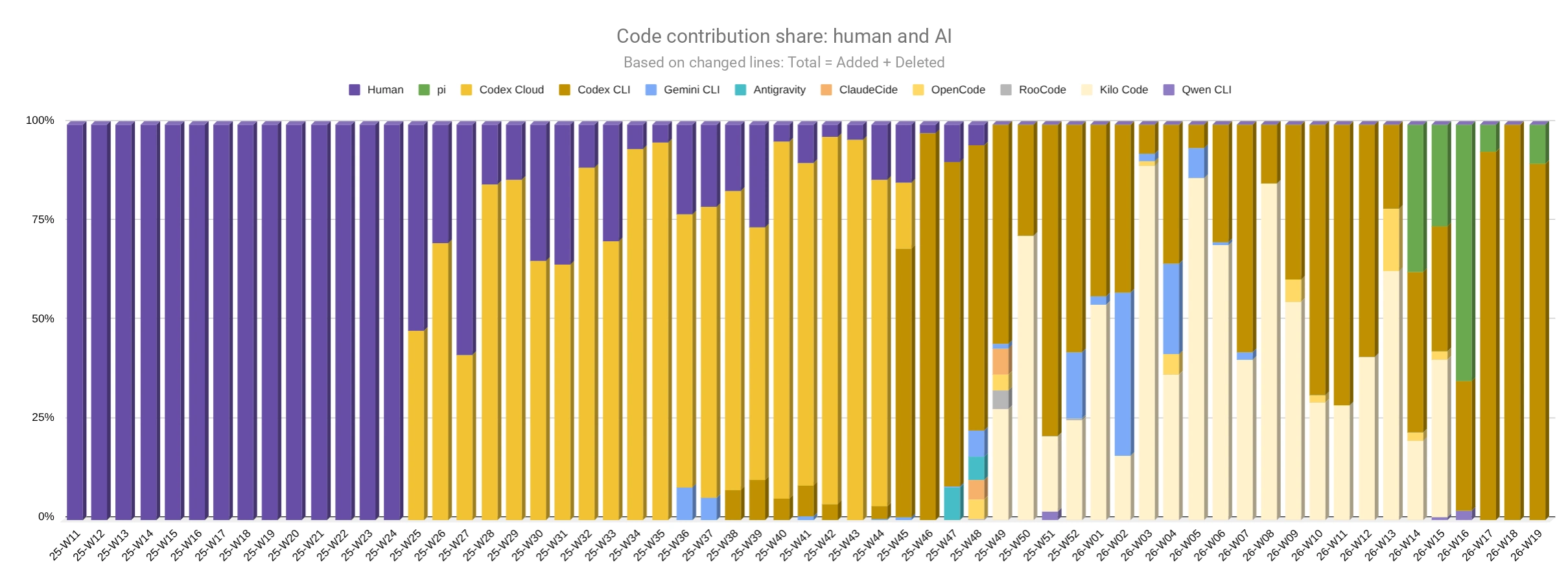
Statistics of my agent usage on the TasK project
This chart illustrates how I tried different AI agents on the TasK project. It shows not only the growth of agent-written code, but also how the toolset changed: Codex Cloud, Codex CLI, Kilo Code, Pi, and others. I did not want to compare them through reviews. I took a current task in my own project and watched how the agent completed it, how autonomous it was, and how good the result was.
New agents and models appear faster than I have time to test them. So below is a short subjective review: what I tried, what stuck, what didn’t, and why.
Codex Cloud is a web agent from OpenAI: the project runs in the cloud, and code review happens directly in the app. It was a good first step: isolation and convenient review. The downsides grow out of the upsides: it is slower, consumes more tokens, and you can’t quickly poke at the result locally while it is working. I do not use it now.
Codex CLI is OpenAI’s CLI agent for working with GPT models. It is my main tool. It runs locally and quickly, and a lot can be configured. I have developed enough trust in the agent with top models that I run it in yolo mode: the agent works with extended permissions and does not ask for confirmation at every step. The main downside is the terminal interface.
Claude Code is Anthropic’s CLI agent for the Opus, Sonnet, and Haiku model families. New agentic ideas often appear there first. I did not manage to properly try it with the native models. Pairing it with GLM-4.7 did not work for me.
At first, I watched Claude Code and Codex CLI evolve and wondered why Codex CLI had so few features. Then I understood: many things that Claude Code often solves through hooks and other mechanisms can be solved in Codex CLI through instructions in AGENTS.md. Codex models follow instructions better, so they need less external scaffolding.
I agree with Mario Zechner’s opinion, the creator of Pi: Claude Code is gradually becoming a "spaceship" like Homer Simpson’s car. It has many capabilities, but in ordinary work you use only a small part of that spaceship, while the rest turns into dark matter — unclear what it does and how it affects the result.
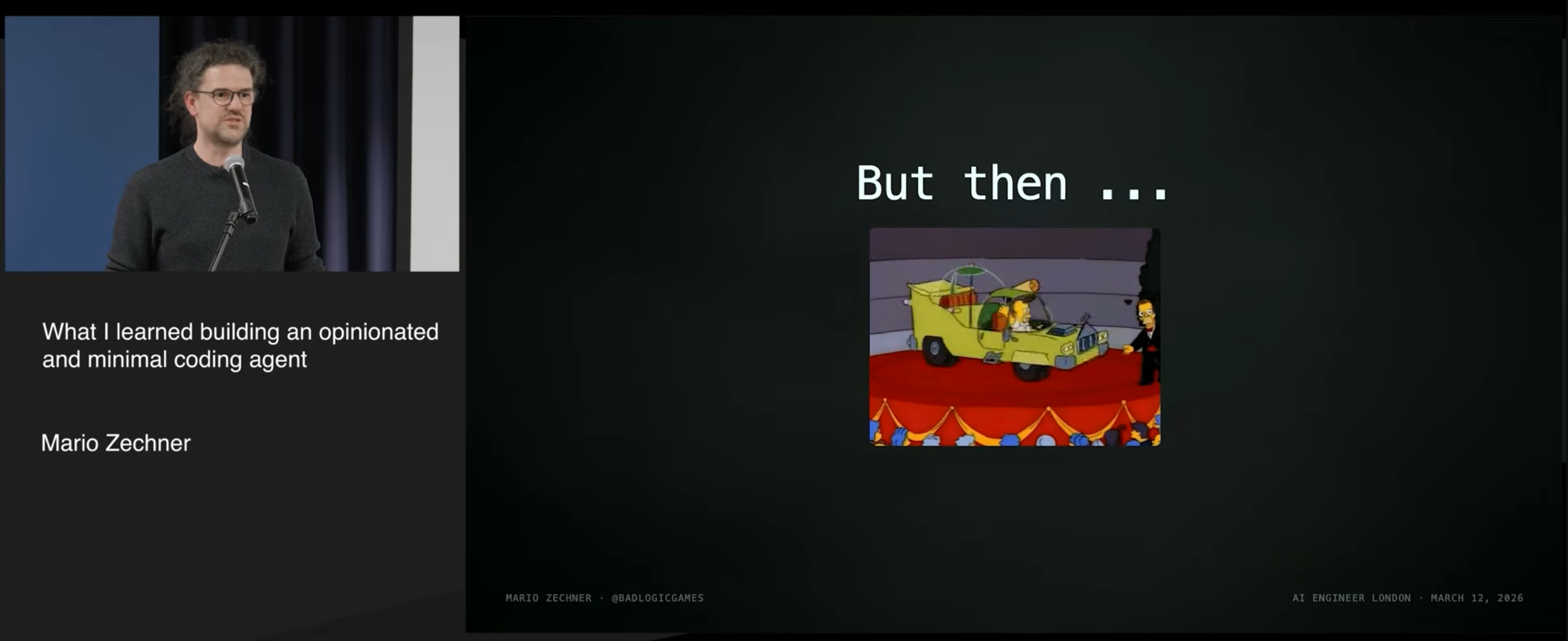
Source: a fragment of Mario Zechner’s talk.
Gemini CLI is Google’s CLI agent for the Gemini model family. It has a free tier: for me it was usually enough for 1–2 tasks per day on strong models. It is good for text and documentation. For example, it helped with texts and translations for task-agents-playbook. In my environment, it writes code weaker than my main setup. I remember how Gemini 2.5 wrecked my project during a mass fix of issues Psalm found after an upgrade.
Antigravity is Google’s IDE, a VS Code fork with an agent. It works with Gemini models and a limited set of other models. When I tried it, it had a free tier. At the time of my test, the product was raw, with annoying bugs, so I did not continue using it.
Aider is one of the early CLI agents with its own character. It had its own model leaderboard for code-editing tasks, and it was interesting to follow. The last official release was on August 10, 2025, but there are fresh commits in the repository. It would be a pity if development simply stalled; maybe it is a pause before something new.
OpenCode is a CLI agent with its own ecosystem of models and pricing. As far as I remember, it has free models, inexpensive subscriptions, and the ability to use local models. I used it quite a lot together with GLM models from Z.ai. The product is decent, but in my setup it noticeably ate tokens. The terminal interface is more feature-rich than Codex CLI, but that does not necessarily make it more convenient: in the terminal, simpler is often better. OpenCode also has one strong signal in its favor: Kilo Code moved to its core. I wrote about my experience with it in "An AI agent for financial analytics" and about SKILLs in OpenCode.
Qwen Code is a CLI agent, a Gemini CLI fork adapted for Alibaba’s Qwen models. I tried it after Qwen-3.6 came out: it coded decently. At that time, there was a free tier of 1000 requests per day; later it was removed.
RooCode is a VS Code extension with many settings. It has semantic search across the project: it helps when you do not remember the exact class name or search through documentation inside the repository. For large codebases, this matters. The project developed very dynamically: sometimes several releases came out per day. I did not want to depend on a tool changing at that pace; I was afraid of losing stability. It is a pity, because the product was interesting. In 2026, the team announced sunsetting Roo Code and switched to Roomote.
Kilo Code is a VS Code extension. It started as a RooCode fork, then the extension was rebuilt around Kilo CLI, and Kilo CLI itself is called a fork of OpenCode in the README. I actively used Kilo before that transition, but the new version initially did not bring over the key feature for me — semantic search. Recently, it returned as Codebase Indexing / semantic_search, but it is still experimental and the product is still rough. I keep watching Kilo as a worthy candidate: I liked its Ask and Architect modes, and answers with Mermaid diagrams explained the agent’s reasoning much better. I described my experience in "First experience with GLM-5".
Pi is a minimalist CLI agent by Mario Zechner. Against the backdrop of monsters like Claude Code, I like its opposite philosophy: a small core, extensibility, and the user builds what they need — including their own spaceships if they want 😎. Pi’s developer focuses on the core and leaves the rest to user extensions. For the last month, I have been actively using Pi on the task-orchestrator project.
Models and my current subscriptions
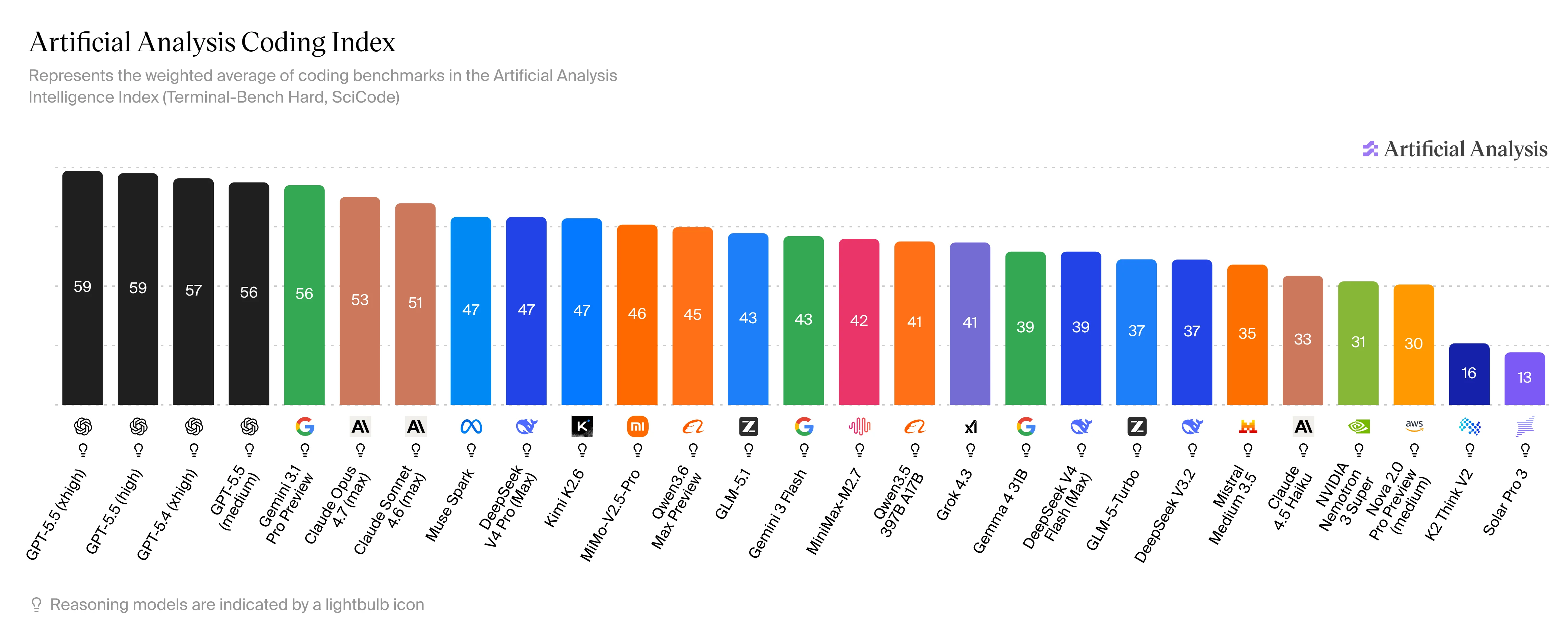
Artificial Analysis Coding Index is one of my reference points for choosing coding models to look at.
Models ship too fast for me to test all of them in real work. After new model announcements, I look at their positions in rankings such as Artificial Analysis Coding Index and decide whether the model is worth trying in practice.
I tried Chinese models from DeepSeek, Qwen, MiniMax, and Z.ai, plus Gemini from Google. I settled into GLM models from Z.ai when they showed good results in my workflow.
At the time of writing, my working combinations are:
- Codex CLI with GPT models:
gpt-5.5 xhigh fast,gpt-5.5 high fast, and versions withoutfast. This is my top choice, but limits are tight and it is somewhat expensive; - Pi with GLM-5.1 from Z.ai. This is a simple working alternative for tasks where I do not worry about limits. On my tasks, GLM-5.1 performs no worse than GPT-5.5.
My current subscriptions look like this: OpenAI Pro for $100 is barely enough for 2–3 coding terminals. Z.ai has a quarterly Pro subscription for $90 ($30 per month), but their prices change often. I’m thinking about going back to Lite: the limits were enough before; speed was what I lacked.
I keep several parallel terminals for different tasks, with short sessions so the context does not bloat.
A very large context makes the session harder to control. A long session behaves like a snowball: the longer it runs, the more tokens every next step consumes, and the faster limits run out. Sometimes the right move is to start a new session and give the agent a short, clean task.
With GLM I had an unpleasant effect: when the context exceeded 100K, the model sometimes went off the rails in its reasoning, mangled words, and got stuck in a long loop. So I limited the context in the agent configuration. In recent weeks, the problem has become rarer, but I still do not like huge sessions.
What I want from an ideal agent
After all these experiments, I have a list of requirements for an agent that is convenient to use through CLI/TUI.
My minimum bar:
- CLI/TUI interface. I prefer the agent to work in the terminal. I keep an eye on GUI agents, but so far they seem raw, slow, and hungry for CPU and memory.
- Skills / instructions. Right now, this is the cheapest way to give an agent a skill — the ability to do something useful correctly: from project work rules to specific scenarios, tools, and specialized actions.
- Tools. There should be a way to add custom tool calls — today this is most often done through MCP.
- Startup context control. The agent needs to quickly receive the necessary minimum context for the task without bloating the session from the first messages. In Codex CLI, part of the context already comes from the model’s base prompt. For example,
base_instructionsfor GPT-5.5 contain a large block about behavior, design, frontend recommendations, and even bans like "do not talk about goblins." When I describe the style, project rules, and agent behavior myself inAGENTS.md, such base context may be redundant or conflict with my instructions. - Extensibility and customization. The agent should let me change and extend functionality for my process, instead of only working in predefined modes.
- LSP or an equivalent. Code navigation should be smarter than
grep. Mario Zechner criticized the use of LSP in OpenCode, but I see it as a useful feature. - Semantic indexing. Especially for large projects: the agent should find relevant code even from an imprecise description or incomplete class name, and find documentation by meaning. This worked well in Kilo Code.
- Support for different providers. Local models, cloud models, backup options for when limits run out.
- Free tier or low-cost entry. I want to test new models before they start eating the budget.
How I built the workflow with agents
Input context
Agent memory
An AI agent has no memory of the past. Its memory is limited to the current conversation session. A new session means starting from scratch: the agent dives into the project as if seeing it for the first time.
I already wrote about this in "Memory and context: lessons from fictional stories for conscious AI". I highly recommend watching the film "Memento": the main character does not remember what happened 15 minutes ago and has to build a system of external reminders. The film shows well how such a system helps avoid forgetting important things — and what happens when memory organization fails.
AI agents are in a similar situation. Everything below is a way to help the agent dive back into the project again and again: with less context, lower token costs, and fewer repeated explanations. This is usually called context management / context engineering.
In my process, agent memory has different horizons:
- Short-term — the current session. It contains the discussion of one specific task. I try to keep it short and close it after the work is done.
- Medium-term — epics and tasks in
todo/. They store working context: goal, criteria, PR, change history, dependencies. - Long-term —
AGENTS.md,docs/, roles, and conventions. These are project rules, architecture, processes, decisions, and instructions.
Same thing as with people.
AGENTS.md as the project constitution
The AGENTS.md file works as an entry point, a router to instructions, and a "constitution" for the AI agent.
It contains:
- Mission and rule priority. This helps the agent understand what matters more when instructions conflict.
- Role — choosing a specialized role before starting work. This shifts the agent’s focus and makes it look at the task from the right angle.
- Reflection — assessing task complexity, context, and risks. This helps the agent avoid rushing straight into code and instead think first, asking clarifying questions when needed.
- User-facing language — communication and naming rules. In my Russian workflow, agents tend to drag in English phrases and terms; I ask them to minimize that.
- Project architecture — stack, infrastructure, folder structure, migrations, modules, and layers.
- Working with code — Git flow, branches, tasks, technical debt.
- Tests and Validation — types of tests and validation tools.
- Pre-delivery checks — requirements before handing over a task.
- Commit format and Pull Requests — how to format commits and PRs, and in which order to act.
- Documentation — what and how to document in the project.
- What is forbidden — explicit bans that prevent the model from doing things it technically can do.
- Mini-checklist for self-review — mandatory actions before handing over the result. It helps the model not forget important steps.
The main rule: do not bloat the root AGENTS.md. In the root, I keep only the most important rules and links to secondary instructions.
Project knowledge and rules become portable because they live not in MCP, Skills, or special features of a particular agent, but in plain Markdown files. If an agent reads AGENTS.md, it can already follow my rules. That is why Pi with GLM-5.1, without extra layers, keeps up with Codex CLI + GPT-5.5 xhigh on my tasks.
Agent roles
Depending on the task, the agent takes a role. The role defines the focus, documents, and quality criteria.
Examples of roles from my process:
- Marketer — promotion strategy, acquisition funnels, market analytics, and metric growth;
- Sales — sales, user conversion, consultations, and market feedback;
- Product Owner — defines the business goal, value, and acceptance criteria;
- Lawyer — legal review, privacy/compliance, user agreements;
- Team Lead — defines the implementation approach, evaluates risks and quality standards;
- System Analyst — clarifies requirements, scenarios, constraints, and edge cases;
- System Architect — designs and checks architecture, module boundaries, and integrations;
- UI/UX Designer — designs UX flows and UI components;
- Copywriter — writes interface texts, microcopy, and error messages;
- Backend Developer — implements server-side logic: DDD, Application/Domain, API, Messenger;
- Frontend Developer — implements UI: Twig, Turbo, Stimulus, AssetMapper, CSS/JS;
- DevOps Engineer — handles containers, environments, CI/CD, and infrastructure make commands;
- Backend Reviewer — reviews PHP, DDD, architecture, style, tests, and security;
- Frontend Reviewer — reviews UI/JS, Turbo/Stimulus, UX, and accessibility;
- DevOps Reviewer — reviews Compose, CI/CD, security, and reproducibility;
- QA Backend — checks use cases/API, test plans, unit/integration tests;
- QA Frontend — checks UI scenarios, e2e, cross-browser behavior, and regression;
- Technical Writer — updates documentation, guides, and contract descriptions.
Examples of addressing roles in a prompt:
Backend developer, take the task from todo/EPIC-status-page.todo.md into work;Copywriter, check the texts in the PR;Frontend developer, do a review.
A role helps the agent shift focus to the right area and look at the task from the right angle.
Same thing as with people.
Project tasks and documents
Tasks as specifications
I call my process Task-driven development — development driven by tasks as specifications.
The idea is simple: the task becomes the source of truth.
A task describes:
- the goal;
- the task history and context;
- boundaries: what is in scope and what is out of scope;
- acceptance criteria;
- required checks;
- test requirements;
- links to context;
- architectural constraints;
- expected output format.
If I need a large feature, I write an epic. The epic is decomposed into atomic tasks. Each task goes through its own cycle: definition → implementation → self-review → role review → PR → my final review → merge.
The term spec-driven development is used in different ways. In modern AI tools like GitHub Spec Kit or Kiro Specs, it is usually a separate layer of artifacts: requirements, design, plan, and task list. My setup is simpler: I do not create a separate spec pipeline. The specification is packed directly into the task: history, boundaries, acceptance criteria, checks, and links to context. In this sense, task = spec.
This works well for agents: the task can live in the repository, be linked to a PR, be updated during work, and be passed between roles. The agent receives not a vague "make it nice," but a goal, boundaries, context, and checks.
Tasks as Code
For task management, I use the filesystem. At the project root there is a todo/ folder with markdown files for tasks and epics. The folder sits next to the code and is versioned in Git, so the task becomes part of the project context: the agent can open it as a normal file, pass it between roles, link it to a PR, and see changes together with code.
By analogy with Docs as Code, I call this approach Tasks as Code. In our memory classification, such a task becomes the agent’s medium-term memory.
To avoid copying rules from project to project, I moved them into a separate repository, todo-md:
Tasks are not a source of long-term project knowledge. The main sources of knowledge are well-written code and the minimal necessary documentation. I do not keep tasks forever: after a release, I delete them. If something needs to be preserved long-term, it is better to move it into docs/; more on that below.
Same thing as with people.
Documentation as a Memory Bank
An AI agent does a good job learning what code does. Well-written code becomes self-documenting. But some knowledge is hard or impossible to extract from code: why the product exists, who the user is, which decisions have already been discussed, why the architecture was chosen, which scenarios are critical, how to deploy, where the MVP and MMP boundaries are.
So along with AI-agent instructions and project tasks, documentation appears in the project. Among developers who use AI, it is often called a Memory Bank.
This documentation includes:
Vision.md— product vision, target audience, value, and principles;Mission.md— mission and value foundation of the product;Strategy.md— business goals and strategies for reaching them;MVP.md— Minimum Viable Product, the minimal version for validating the idea;MMP.md— Minimum Marketable Product, the minimal version for market launch;StoryMapping.md— user story map with backbone activities and release slices;- ADR — descriptions and purpose of architectural decisions;
- module documentation;
- SDLC — Software Development Life Cycle with role distribution;
- infrastructure descriptions for development, test, and production environments;
- deployment instructions;
- theme components for building UI;
- user documentation for working with the system.
There is a lot of project documentation, so the agent needs hints on when to use which documents. I solve this through roles: each role receives different document sets at the entrance, and the agent decides what to pull in depending on the request. One example is the Product Owner role, which links to such documents.
Same thing as with people.
Architecture, rules, and quality
Modular monolith
A well-isolated modular monolith, written according to DDD principles, fits development with AI agents well: the agent can gather the needed context more easily, search less across the project, and spend fewer tokens and less time.
What helps here:
- all code is in one repository;
- modules are split by domain boundaries;
- the
High cohesion, low couplingprinciple reduces the need to dive into unrelated modules and classes; - a ubiquitous language in the domain makes navigation easier;
- CQRS separates read and write scenarios.
I have a lot of experience with PHP, so it is easier for me to do the final review, design architecture, and validate implementation. Plus modern PHP provides proper types, strict typing through declare(strict_types=1), readonly, enum, Composer, and a large ecosystem of tools and libraries.
Symfony complements this with a mature framework for complex applications: a dependency injection container, console commands, queues through Messenger, validation, serialization, HTTP client, testing infrastructure, and mechanisms on top of which you can build modular architecture.
Tests
An important part of development with AI agents is having tests: Unit, Integration, E2E, Smoke.
For testing, I use several levels:
- Unit — fast class tests. They do not use a database or external services. You need many of them: they help preserve the computational integrity of a class during changes. They run in the test environment.
- Integration — verify interaction between layers and infrastructure. They require a test database, but no interaction with external services. Because of the database, they are slower, so they should cover important parts of the code. They run in a dedicated test environment with a separate database.
- E2E — verify user scenarios and critical parts of the user journey. They require a database and sometimes external services. They are slow, so I run them when covered functionality changes and before releases. They run in a separate e2e environment with a separate database and its own settings.
- Smoke — a minimal set of quick manual checks for the current project configuration. They answer the question: is the subsystem or component basically alive? They are used only manually when I need to quickly check part of the system.
To run Unit, Integration, E2E, and some Smoke tests, I use PHPUnit. I keep an example configuration in coding-standard. Smoke checks are also written as Smoke Commands — console commands for manual runs.
Same thing as with people.
Conventions: Coding Standard
Conventions are a set of rules and agreements that regulate style, code structure, and architectural approaches. They help keep code uniform, readable, and maintainable.
For easy connection to my projects, I moved the conventions into a separate public repository, coding-standard.
Agents have trouble following a large rulebook consistently: they may bring in something of their own, miss the project style, violate layer isolation, or start bloating layers that should stay thin. So I enforce part of the conventions with automatic checks: rules for Deptrac and sniffs for PHPCS.
To maintain code cleanliness, I use these utilities:
| Utility | Example configuration | Goal | |
|---|---|---|---|
| PHP_CodeSniffer | phpcs.xml.dist |
Code style check | |
| Psalm | psalm.xml |
Static type analysis | |
| Deptrac | depfile.yaml |
Architectural dependency check | |
| PHPMD | phpmd.xml |
Problematic code detection |
Same thing as with people.
Git workflow
Git workflow is a set of rules for working with branches, commits, PRs, and releases. I explicitly tell the agent which branch to create, how to format the commit, when to open a PR, and what to check before merge.
I also check commit format automatically: locally and in CI. This is another feedback loop: the agent formats a commit, the check shows a problem, the agent fixes the message and repeats the check.
Same thing as with people.
Feedback loop for the agent
In the feedback loop, I use tests, static analyzers, and utilities for automatic convention checks. The agent creates, changes, or deletes code, runs checks, and gets a deterministic result. If a check fails, the agent reads the output, fixes the code, and runs the checks again. If there are no problems, it exits the loop.
The more checks the agent passes before handing over the task, the less manual work remains for final review.
Utilities: one command for checks
The agent needs deterministic commands. If a check consists of ten manual actions, it will forget one step or use the wrong parameters. So I use a Makefile.
Example:
check: cs psalm deptrac test

cs:
    vendor/bin/phpcs

psalm:
    vendor/bin/psalm

deptrac:
    vendor/bin/deptrac analyze

test:
    vendor/bin/phpunit
In AGENTS.md, it is enough to write:
After finishing work on the task, before the final response to the user, run `make check`.
If `make check` fails, fix the causes of the failure and run it again.
Hand over the task only after `make check` succeeds.
That is the feedback loop: the agent made changes, ran checks, fixed the found issues, repeated the run, and returned the task only after successful checks.
Workflow
Planning
Work usually starts with defining a task or an epic. Code comes next.
Example prompt:
Take the analyst role. I need a status page for the project. Create an epic for this task.Then the process looks like this:
- Request. I define the role and the goal.
- Generation. The agent loads the role, task-definition rules, templates, and writes the epic.
- Self-review. I ask the agent to recheck itself and fix weak spots.
- Review. I ask another role to check the task: architect, reviewer, QA, DevOps.
- PR creation. The agent prepares changes in a separate branch and opens a PR.
- Final Review. I read the task myself and leave comments.
- Close. The agent merges the PR, deletes the branch, returns to master, and waits for the next command.
"Better to lose one day now and then fly there in five minutes."
— folk wisdom
A bad task definition almost guarantees a bad solution. A good task definition does not guarantee a perfect solution, but it reduces the "review → fix" loop during final review.
Implementation
Implementation is similar to planning, except the agent changes code instead of task text.
Example prompt:
Backend developer, take the task from todo/EPIC-status-page.todo.md into work.Then:
- Request. I give the role and the task file.
- Implementation. The agent writes code, tests, migrations, and documentation.
- Checks. It runs PHPUnit, PHPCS, Psalm, Deptrac, PHPMD, Composer, or
make check. - Self-review. It checks its own solution.
- Role review. Another role looks at architecture, tests, UX, or infrastructure.
- PR. The agent creates a pull request.
- Final review. I read the result and go through the "comment → fix" loop with the agent.
- Merge. The agent merges, deletes the branch, and returns to master.
- Release. Before release, the agent runs e2e, prepares the changelog and tag. I deploy production myself.
The value of this process comes from splitting the work into stages. The agent does not do everything in one jump: first it implements, then checks itself, then hands the result to another role, and only then passes it to a human for final review. This stage separation, together with upfront task planning, improves implementation quality and reduces the time a human spends on final review.
Final review
During final review, I look not so much at the implementation itself as at whether the code follows project rules: conventions, module isolation, the High cohesion, low coupling principle, domain boundaries, and the ubiquitous language of the domain.
I also check what has not yet been moved into deterministic tools: strange decisions, unnecessary complexity, security violations, and obvious garbage. If something feels wrong, I usually ask the agent why it did it that way. Then I either agree, or the agent reworks it.
I almost do not read test code: I open it rarely, when I need to check a specific scenario or the reason for a failure.
I separately check PR formatting. For example, I care that the agent puts its own label on the PR: later I use those labels to build reports on the agents’ share of work.
I read changes to agent rules more carefully than regular code. A good rule gives a large return, but agents do not always write good rules for themselves: often the result is verbose and misses the point. I think this can be improved if I spend time teaching agents to write such rules better. For now, I prefer to proofread those changes manually.
During final review, I also record recurring agent mistakes. Later they become new rules, checks, and process refinements.
Retrospective
A retrospective is needed to increase the agent’s autonomy and quality. I look at which problems repeat and turn them into rules, checks, templates, or process clarifications.
The cycle is:
- Observation. I watch the agent’s work during the process and on review. I record failures, misunderstanding of context, unnecessary actions, and mistakes.
- Analysis. I identify repeated patterns that waste time and tokens. I look for a systemic solution: what to change in an instruction, template, or tool so the error does not repeat.
- Improvement. I make a targeted change in
AGENTS.md, a role, a task template, documentation, a linter config, a Deptrac rule, a sniff, or a test.
It is important to follow the principle of isolated changes. Do not change everything at once — otherwise you cannot track the effect of a specific edit. Improvements should be introduced in small portions, and the effect should be checked immediately.
A real epic and result: the status page epic and its implementation in TasK — the status page.
Result metrics
What the numbers showed
I have almost stopped writing code by hand. This raises an important question: did productivity grow?
To answer it, I started collecting detailed metrics for the TasK project, because most of my development happens there. I also look at general metrics across my other projects on GitHub.
Project size as of May 13, 2026
| Language | Files | Lines | Blanks | Comments | Code | Complexity | LPF |
|---|---|---|---|---|---|---|---|
| PHP | 5 985 | 398 495 | 61 695 | 25 693 | 311 107 | 8 554 | 67 |
| Markdown | 562 | 59 330 | 12 369 | 0 | 46 961 | 0 | 106 |
| Twig Template | 252 | 20 657 | 1 450 | 0 | 19 207 | 799 | 82 |
| YAML | 199 | 14 168 | 676 | 447 | 13 045 | 0 | 71 |
| Plain Text | 43 | 10 248 | 106 | 0 | 10 142 | 0 | 238 |
| JavaScript | 37 | 7 158 | 1 164 | 247 | 5 747 | 802 | 193 |
| Shell | 29 | 2 194 | 315 | 164 | 1 715 | 247 | 76 |
| BASH | 16 | 596 | 82 | 26 | 488 | 90 | 37 |
| JSON | 16 | 9 467 | 0 | 0 | 9 467 | 0 | 592 |
| HTML | 9 | 148 | 2 | 0 | 146 | 0 | 16 |
| Makefile | 9 | 840 | 147 | 73 | 620 | 32 | 93 |
| CSS | 4 | 538 | 95 | 29 | 414 | 0 | 135 |
| XML | 4 | 300 | 2 | 0 | 298 | 0 | 75 |
| Dockerfile | 2 | 217 | 20 | 6 | 191 | 16 | 109 |
| Sass | 2 | 16 | 0 | 0 | 16 | 0 | 8 |
| Docker ignore | 1 | 16 | 0 | 0 | 16 | 0 | 16 |
| INI | 1 | 12 | 0 | 0 | 12 | 0 | 12 |
| Python | 1 | 180 | 40 | 15 | 125 | 24 | 180 |
| SQL | 1 | 1 | 0 | 0 | 1 | 0 | 1 |
| Total | 7 173 | 524 581 | 78 163 | 26 700 | 419 718 | 10 564 | — |
If roughly converted to LLM context, this size is around 5–7 million tokens. The estimate depends on the tokenizer and the file mix, but the order of magnitude is clear: you cannot keep such a project entirely in the model context. You need module boundaries, tasks, documentation, and checks; otherwise context quickly turns into noise.
File and line distribution
The charts show that PHP dominates: 83.4% of files and 76.0% of lines. But markdown already has a noticeable share — 7.8% of files and 11.3% of lines. These are tasks, instructions, roles, conventions, and documentation. For the agentic process, they became part of the codebase, not text next to the code.
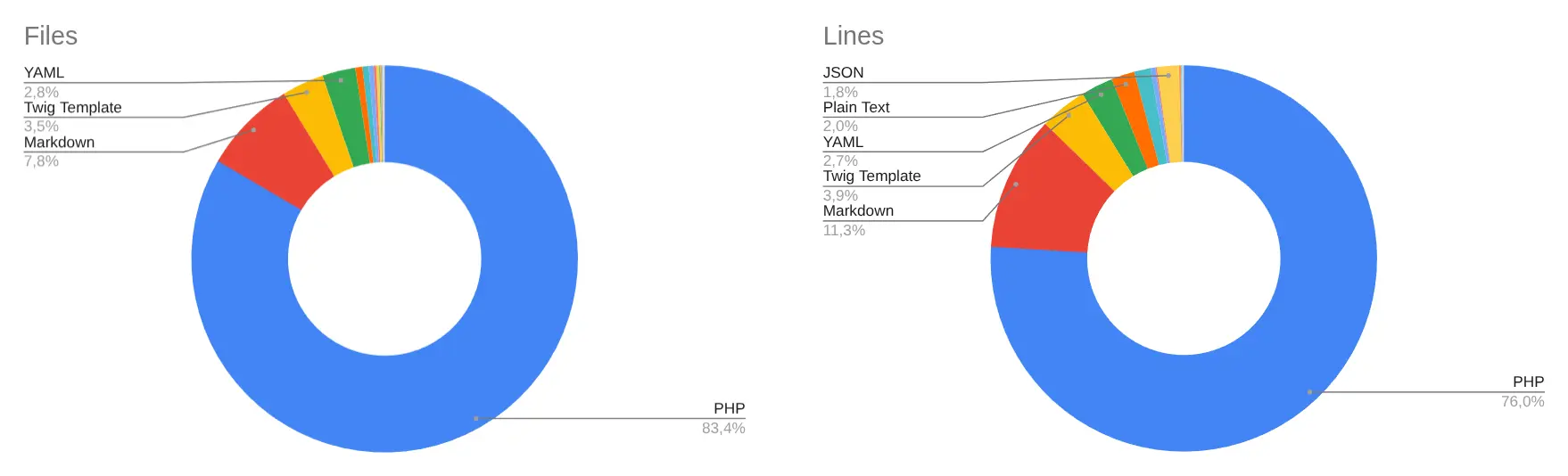
Number of files and lines by type.
Agent share in code generation
The chart is based on "touched" lines from diffs: Added + Deleted. Before week 25 of 2025 (mid-June), almost everything went through manual development. After connecting Codex Cloud, the share of agent-written code quickly became dominant, and then a period of tool selection began: Codex Cloud was replaced by Codex CLI, I tried Kilo Code, OpenCode, Gemini CLI, and others, and later Pi entered the current setup.
Share of touched lines by week: human and AI agents.
How much code agents started changing
The first cut is weekly diff volume: how many lines were added and how many were deleted. After switching to agents, the bars became higher: more changes started entering development. Large deletion peaks are partly related to moving some solutions from the main project into separate public packages.
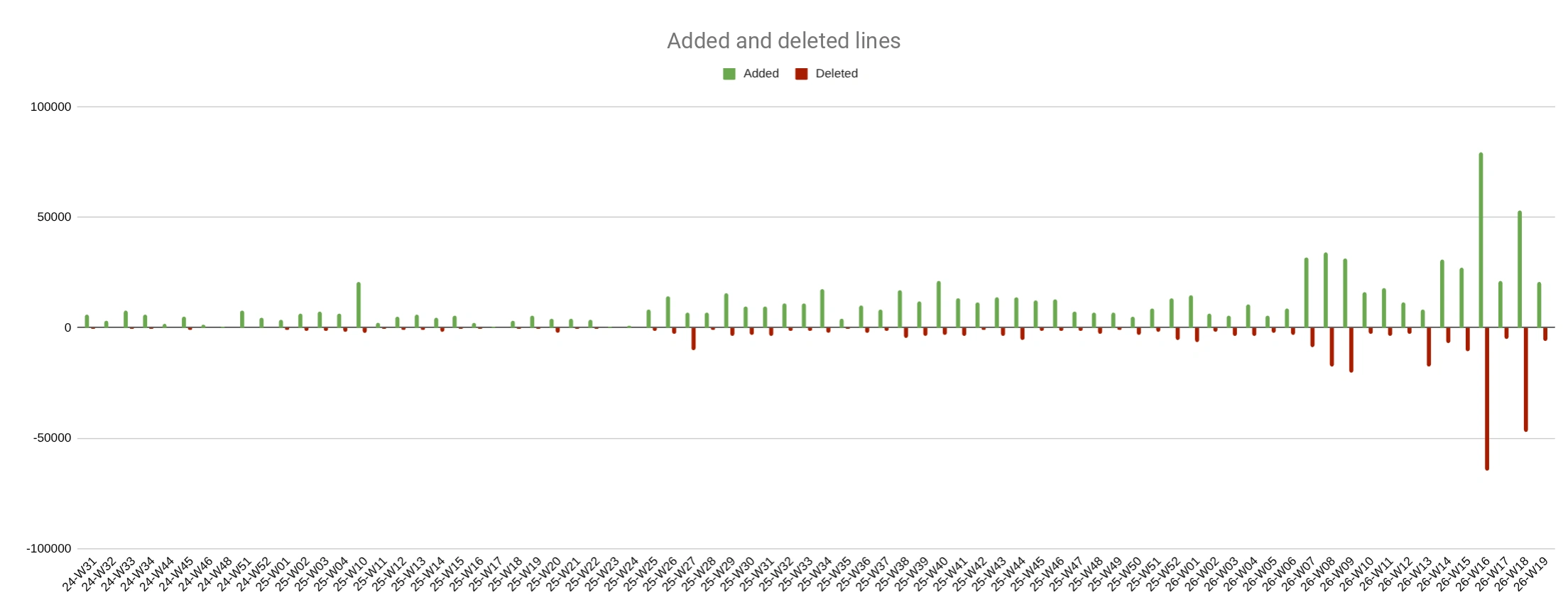
Added and deleted lines by week.
To answer the productivity question, it is more useful to compare averages before and after I started using agents in the project. Total — the overall volume of changes — grew about 11.3x: from 4.1K to 46.4K lines per week. Net — net growth — grew about 4.5x: from 2.7K to 12.2K lines.
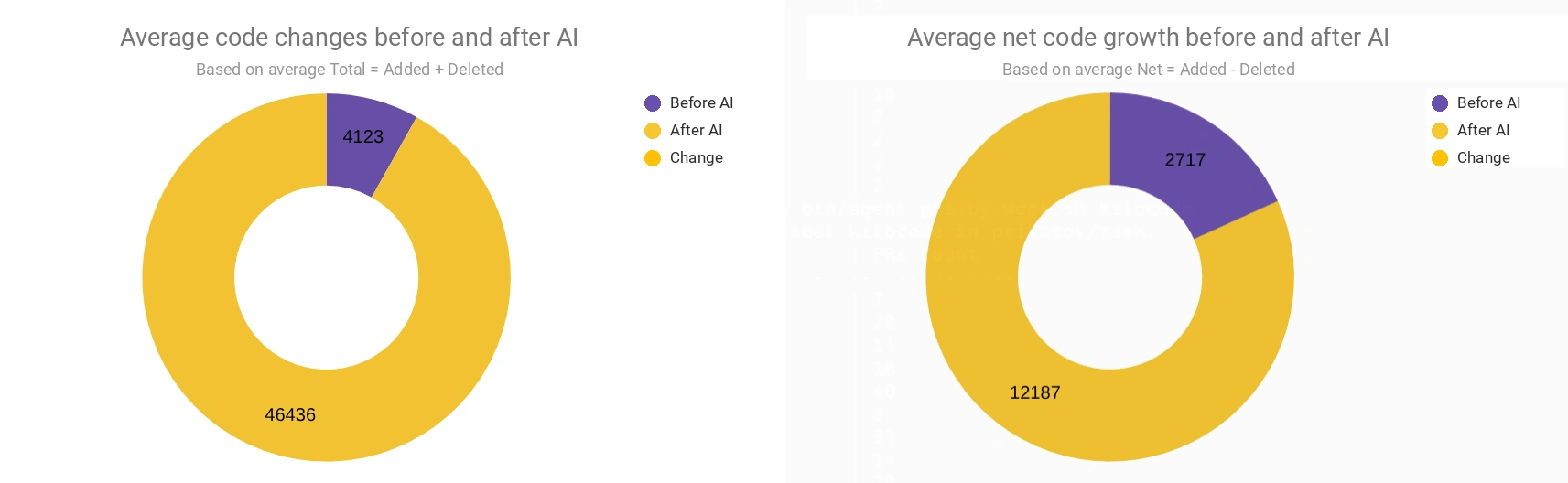
Average values before and after switching to AI agents.
The difference between Total and Net matters. It shows that the growth is not just adding new lines. A significant part of the work is changes to existing code.
It matters not only how many lines change, but also where they change. After connecting agents, the share of tests grew noticeably. In 2026, more changes started landing in markdown: tasks, instructions, roles, conventions, and documentation became a working part of the project.
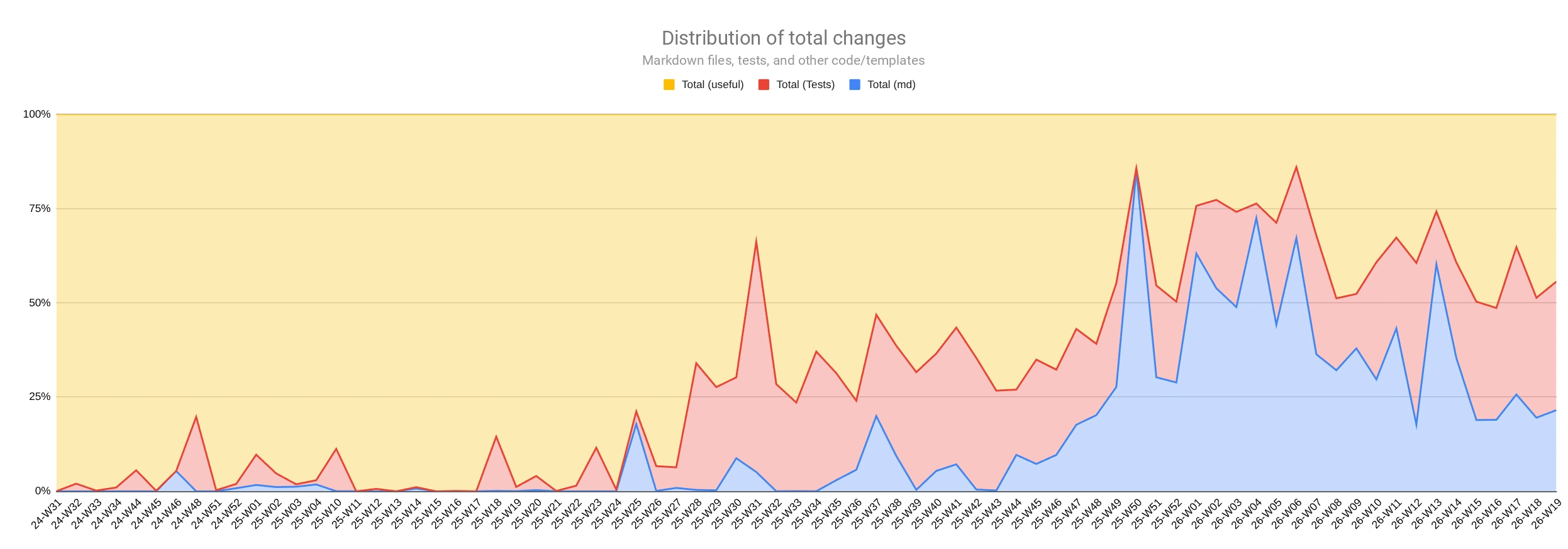
Shares of changes in code, tests, and markdown by week.
Not everything grew together with lines
The picture is calmer for commits and PRs. After June 2025, activity increased, but not 11x. This is a different cut: lines show the volume of changes, while PRs show how many tasks were completed.
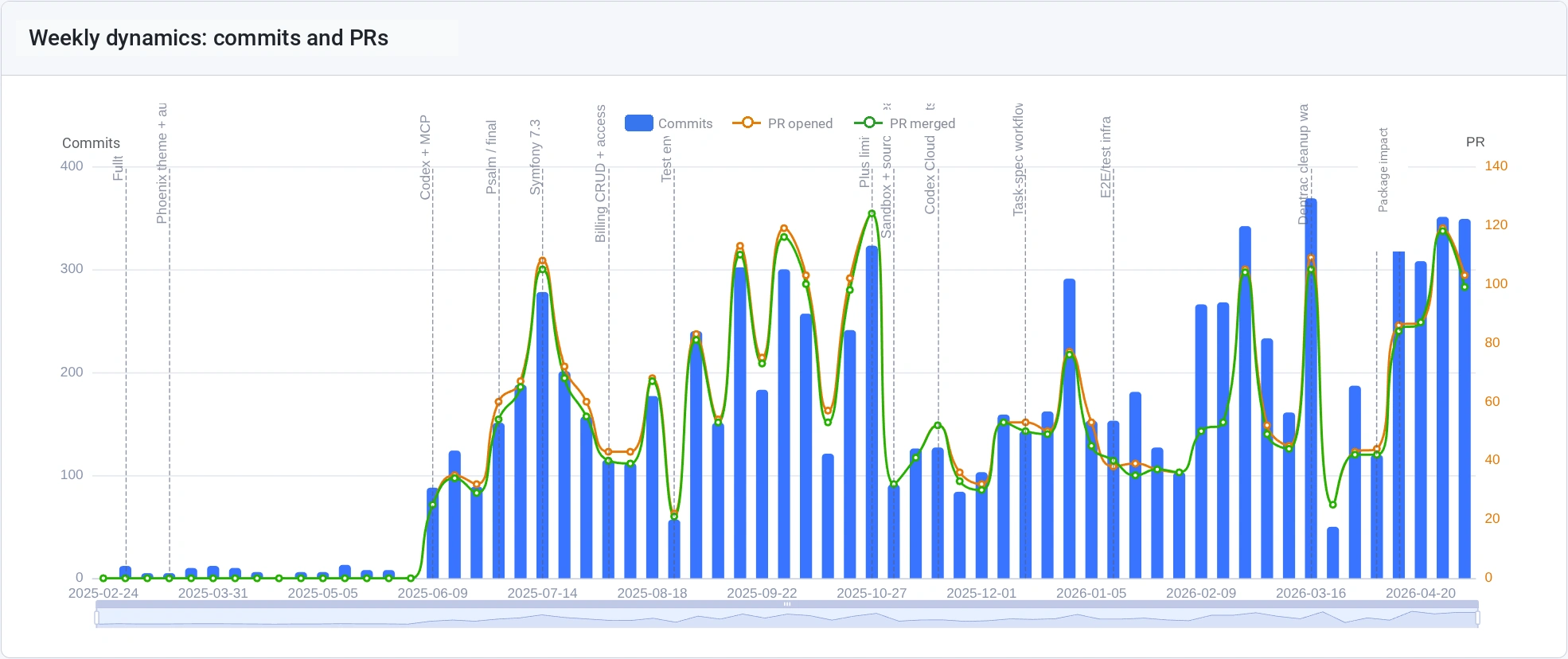
Commits and PRs by week.
There is a dip in November 2025: that is when Codex Cloud introduced hard limits, and I went looking for alternatives. I wrote about it separately: "Codex Cloud limits".
But PR size changed. There are not many times more PRs, but in some weeks a single PR carries noticeably more lines. This is partly related to adding automatic code checks: after new rules were introduced, I had to mass-fix the project to satisfy them. At the end of the chart, you can also see the extraction of some solutions from the main project into public packages.
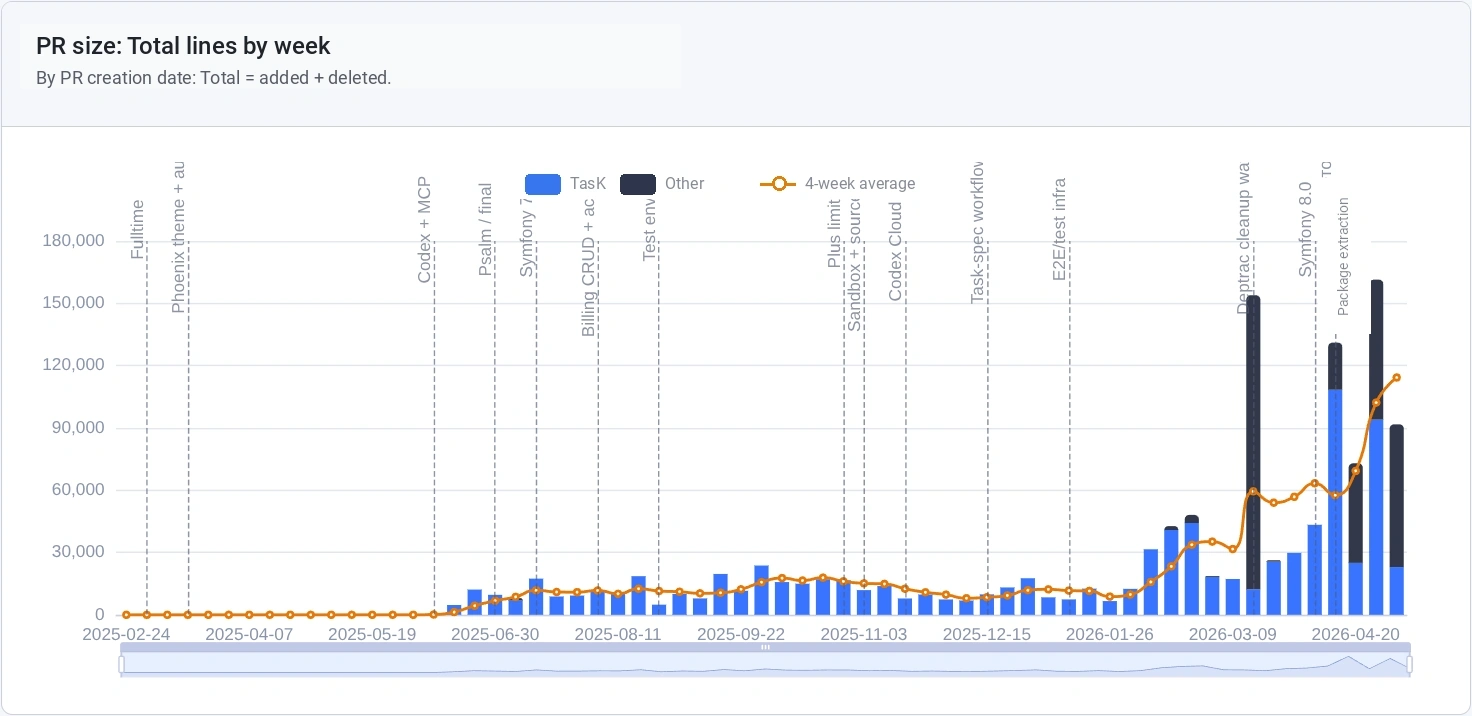
PR size by lines: Added + Deleted.
The numbers show:
- productivity grew if measured by change throughput;
- tests, documentation, and task definition received more attention;
- the number of PRs did not grow 10x, so the bottleneck shifted to orchestration and review.
Public projects that grew out of this process
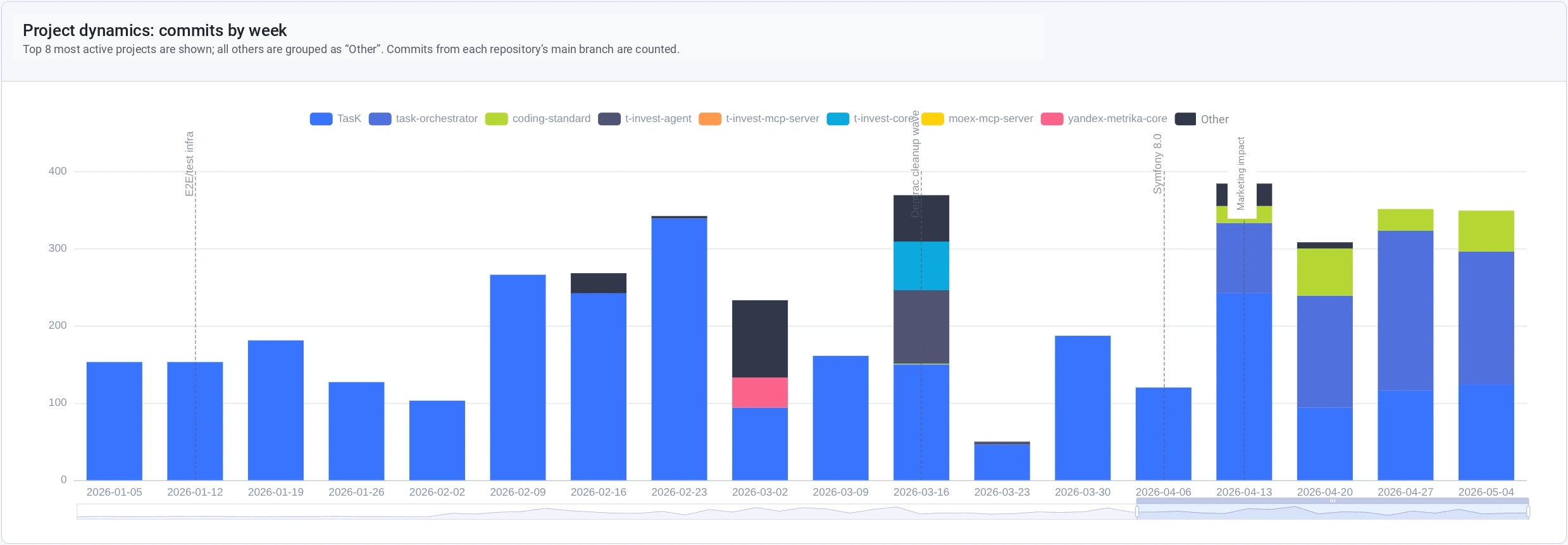
The TasK project is growing, and I want to reuse some solutions in other projects. So I started extracting independent pieces into public repositories.
TasK Orchestrator
Repository: github.com/prikotov/task-orchestrator
The idea is to move my biggest pain point into an orchestrator: guiding an epic or task through the process up to Final Review. Orchestration itself — moving a task through the process — is not difficult. What is hard is constantly switching, restoring context, and making small decisions.
The orchestrator should become a tool that holds the process: roles, tasks, checks, statuses, and transitions between stages. It should take the small stuff away from me and leave me with the parts that really need my attention.
Coding Standard
Repository: github.com/prikotov/coding-standard
This repository contains conventions, configuration examples, and validation tools: architectural rules, sniffs, examples for Symfony projects.
An agent can drift away from conventions. A check should catch the drift before my final review.
Todo-md
Repository: github.com/prikotov/todo-md
These are rules and templates for tasks. A minimal task-management system through markdown files and a Kanban approach.
Git-workflow
Repository: github.com/prikotov/git-workflow
Rules for working with branches, commits, PRs, releases, and deployment. Agents need such instructions to perform repeated Git workflow steps consistently: create branches, format commits, open PRs, set their labels, and pass checks.
What I want to improve next
The main bottleneck now is time. New coding agents, models, and approaches appear faster than I can try them in practice. Reviews help narrow the list, but everything still needs to be tested on real tasks. Because of lack of time, development of some personal projects has stopped, and I also want to return to them with agents.
So the first thing I want to optimize is time spent on manual orchestration: right now, a lot of time goes into guiding a task through the process. For this, I am building TasK Orchestrator — a tool that should guide a task through its lifecycle.
Another way to save time is to connect agents to research. I started using them to study tools so I do not have to dissect every new thing from scratch myself. Examples: "Summary table: AI-agent frameworks and orchestrators" and "Coding Agents — Comparison summary table (final version)".
Security is a separate topic. I need protection against secrets getting into the repository. I already had a case: an agent wrote the password to my proxy into documentation, and I did not notice it.
The same time-saving logic pushes agents beyond software development — into investing and content creation. I wrote about investing in "An AI agent for financial analytics: analyzing a T-Investments portfolio with OpenCode", and about content in "SKILLs in OpenCode: a process approach to content creation". I want to dig deeper into investing: portfolio management quality needs improvement, and the market is not exactly forgiving.
PHP + AI = ❤️
In the PHP world, AI-assisted development still does not look as active as it does in the Python/TypeScript world. I want to show from my own experience that AI agents can work in a large PHP/Symfony project too.
I test everything described in this article on TasK. If you are interested in building an AI-first product on PHP, join as a developer or an early user. News and discussion are in the Telegram channel, mostly in Russian for now.
Sources and links:
- My experience with Codex: impact on productivity — first experience with Codex and measurements of its impact on development (in Russian).
- Codex Cloud limits — why I moved from Codex Cloud to CLI agents (in Russian).
- First experience with GLM-5: coding with Kilo Code — an example of working with a GLM model and Kilo Code (in Russian).
- An AI agent for financial analytics: analyzing a T-Investments portfolio with OpenCode — an experiment with an agent outside software development (in Russian).
- SKILLs in OpenCode: a process approach to content creation — how I applied skills to content preparation (in Russian).
- Memory and context: lessons from fictional stories for conscious AI — an article about memory, context, and external reminders (in Russian).
- TasK — the project where I test the described process.
- task-agents-playbook — a playbook with roles, rules, and instructions for agents.
- task-orchestrator — a task orchestrator and experiments with agent-based research.
- coding-standard — conventions, sniffs, and validation configurations.
- todo-md — rules and task templates in markdown.
- git-workflow — rules for branches, commits, PRs, and releases.
- Artificial Analysis Coding Index — the model ranking I check before trying new models.
- Codex CLI — my main CLI agent from OpenAI.
- Pi coding agent — a minimalist CLI agent that I use with GLM models.
- Z.ai subscription plans — GLM models work well in my environment; even the Lite plan gives me more than enough limits for regular coding sessions.